
How Can I Create a Digital Business Card for Free?
In today’s fast-paced digital world, first impressions happen online—and your business card should too. Gone are the days of carrying stacks of paper cards that end up forgotten in a wallet or trash bin. Now, digital business cards let you share your contact details instantly with just a tap or a scan.
Whether you’re a freelancer, small-business owner, or entrepreneur, learning how to create a digital business card for free can give your brand a modern, professional edge without spending a dime.
Let’s walk through everything you need to know—from what digital cards are and how they work, to which free platforms and apps you can use to design one today.
What Is a Digital Business Card?
A digital business card (sometimes called a virtual business card or e-business card) is an online version of a traditional paper business card. It contains your contact information—such as your name, job title, company, phone number, email, website, and social media links—but is shared digitally instead of printed.
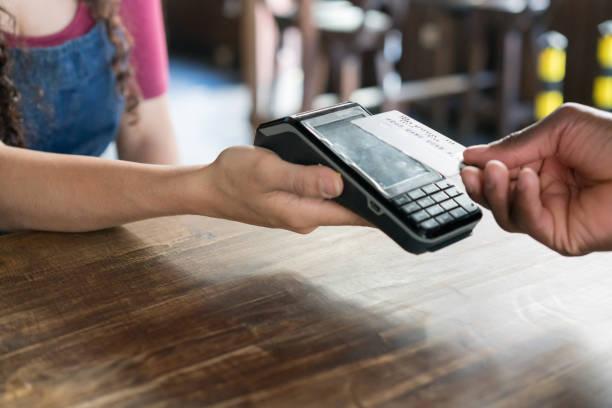
You can send it via text, email, LinkedIn, or even embed it in a QR code. Some cards also support NFC technology, allowing you to share your details instantly when someone taps your card with their phone.
The best part? It’s completely eco-friendly and always up to date—you can edit your details anytime without reprinting.
Why You Need a Digital Business Card
Digital business cards are more than just trendy—they’re practical, professional, and powerful marketing tools. Here’s why you should have one:
-
Instant Sharing: Exchange contact info in seconds with just a tap, link, or scan.
-
Eco-Friendly: No paper, no waste—just pure digital convenience.
-
Always Updated: Edit your card anytime and your recipients always have your latest info.
-
Affordable: Many platforms offer free versions with impressive features.
-
Interactive Design: Add clickable links, videos, or even booking buttons to make your card stand out.
In short, digital business cards help you connect smarter, not harder.
Step-by-Step: How to Create a Digital Business Card for Free
Let’s get to the exciting part—how to make your own digital business card without spending any money.
Follow these easy steps, and you’ll have your virtual card ready to share in minutes.
1. Choose a Free Digital Business Card Platform
Your first step is choosing the right tool. Thankfully, several free platforms make it simple. Here are some of the most popular and reliable options:
-
HiHello: Offers free customizable templates, QR codes, and contact sharing options.
-
Canva: Known for its drag-and-drop interface—perfect if you want to design a visually appealing card from scratch.
-
Popl: Great for NFC-enabled sharing and offers free digital profiles.
-
Beaconstac: Lets you generate dynamic QR codes for your card.
-
L‑Card: A simple mobile app with free templates and sharing features.
Each of these tools provides a free tier that includes basic yet professional features to create and share your card.
2. Sign Up and Create an Account
Once you pick a platform, create a free account using your email or Google login.
Most tools offer quick registration, and you can start building your card right away.
Make sure to verify your account if required—this ensures your card is secure and easy to manage later.
3. Add Your Contact Information
Now comes the fun part—adding your personal and professional details. Include:
-
Full Name
-
Job Title and Company Name
-
Phone Number
-
Email Address
-
Website or Portfolio
-
Social Media Links (LinkedIn, Instagram, Facebook, etc.)
-
Company Logo (optional)
Keep your information accurate and professional. If you’re a freelancer, linking to your Upwork or Fiverr profile can also help attract new clients.
4. Customize the Design
The beauty of digital cards is that you can make them look exactly how you want.
Most platforms offer free templates where you can change colors, fonts, layouts, and icons. Make sure your design matches your brand personality—whether minimalist, bold, or elegant.
Here are a few tips for a polished look:
-
Use your brand’s colors for consistency.
-
Choose readable fonts.
-
Keep your layout clean and uncluttered.
-
Add a profile picture or logo for recognition.
If you’re using Canva, you can even add animated backgrounds or clickable buttons.
5. Add Interactive Elements
What makes digital cards special is their interactivity.
You can include clickable links to your email, social profiles, and portfolio. Some platforms let you embed videos (for example, a short introduction hosted on YouTube) or add a contact-save button that lets recipients store your details instantly.
If you use Popl or HiHello, you can even include calendar links, payment apps (like PayPal or Venmo), or booking forms—perfect for service-based professionals.
6. Generate Your Digital Business Card Link or QR Code
Once your card is ready, most platforms give you a unique URL or a QR code.
You can share this link via email signature, social media bio, WhatsApp, or even print the QR code on flyers or banners.
When someone clicks or scans your link, they’ll instantly access your contact information—no app download required!
7. Test and Share Your Card
Before sending it out, test your card on different devices (Android, iPhone, desktop). Check if all links work correctly and that your layout looks clean.
Then, start sharing! You can:
-
Add the link to your email signature.
-
Include it in your LinkedIn profile.
-
Send it in WhatsApp chats.
-
Display your QR code at your office or events.
Best Free Digital Business Card Makers
To save you time, here’s a quick comparison of some of the best free digital business card platforms available:
|
Platform |
Free Features |
Best For |
|
HiHello |
Custom templates, QR code, and URL sharing |
Professionals and small businesses |
|
Canva |
Fully customizable designs |
Designers and creatives |
|
Popl |
NFC sharing + free profile link |
Entrepreneurs and influencers |
|
Beaconstac |
Dynamic QR codes |
Businesses that want analytics |
|
L-Card |
Mobile app convenience |
Sales teams and networkers |
|
Adobe Express |
Professional templates |
Creative branding |
|
Haystack |
Auto-updates contacts |
Teams and corporations |
Each has strengths—choose based on your needs, whether that’s branding, analytics, or NFC compatibility.
Tips to Make Your Digital Business Card Stand Out
Even though digital business cards are convenient, many people use them—so yours needs to shine.
Here are a few simple yet powerful ways to make your card memorable:
-
Use a Professional Photo: A clear headshot builds trust instantly.
-
Keep It Simple: Don’t overload your card—focus on essential info.
-
Add a Call-to-Action (CTA): Something like “Let’s Connect!” or “Book a Call.”
-
Include a Personal Touch: Add a tagline or short intro sentence that describes what you do best.
-
Test Your Links Regularly: Broken links can make a bad impression.
-
Update Often: New phone number or website? Update your card immediately.
A well-designed card can make a strong impact on potential clients or employers.
The Role of NFC in Digital Business Cards
NFC (Near-Field Communication) is a game-changer for networking. With NFC, you can share your digital card simply by tapping your smartphone or physical NFC card against another phone.
Platforms like Popl, HiHello, and Mobilo let you order NFC-enabled cards that link directly to your digital profile. It’s a great way to blend the tactile feel of a physical card with digital convenience.
And yes—many NFC cards are free or offer free basic plans for digital profiles!
Are Free Digital Business Cards Really Free?
Most free versions give you all the essentials—custom design, contact sharing, and QR codes.
However, some premium features (like advanced analytics, custom domain links, or team management) may require an upgrade.
Still, for individuals or freelancers, free plans are more than enough to create a professional and shareable digital business card.
Common Mistakes to Avoid
While creating your digital business card, watch out for these pitfalls:
-
Overloading information: Keep it concise; too much info can overwhelm viewers.
-
Ignoring mobile view: Most people open your card on their phone—test it first!
-
Using outdated contact info: Double-check everything before sharing.
-
Low-quality visuals: Use high-resolution images for a crisp look.
-
Skipping branding: Use your logo, brand color, and consistent style to stay recognizable.
Avoiding these mistakes ensures your card looks polished and trustworthy.
Benefits of Using a Digital Business Card
Let’s sum up what makes digital business cards an absolute must-have:
-
Convenience: Share instantly anywhere, anytime.
-
Eco-Friendly: No paper waste or printing costs.
-
Professional Appeal: Modern and sleek look for any business.
-
Cost-Effective: Most platforms offer free or low-cost options.
-
Scalable: Perfect for both individuals and companies.
-
Trackable (on some apps): Know how many people viewed or saved your card.
They’re the perfect blend of sustainability and sophistication.
Future of Networking: Smart and Digital
The future of networking is digital, interactive, and data-driven. As people embrace remote work and global communication, virtual contact sharing becomes essential.
Emerging technologies like LinkedIn integration, AI-powered personalization, and smart NFC tags are redefining how professionals connect.
Soon, you might see digital business cards that update automatically based on your latest online activity or that sync directly with your Google Contacts and Microsoft Outlook.
By creating your free digital business card today, you’re already stepping into this future.
Frequently Asked Questions (FAQ)
1. What’s the best free app to make a digital business card?
HiHello and Canva are among the most popular free options. HiHello focuses on easy sharing and digital contact management, while Canva offers full design freedom.
2. Can I add my digital card to my phone’s wallet?
Yes! Platforms like HiHello and Popl allow you to save your digital business card to Apple Wallet or Google Wallet, making it easy to access anytime.
3. Is a digital business card safe?
Absolutely. Reputable platforms use SSL encryption and privacy protection to keep your data secure. Always choose a trusted provider.
4. Do digital business cards work without internet?
Most require an internet connection for first access, but once someone saves your contact info, they can view it offline.
5. Can I print my digital business card?
Yes! Many apps generate printable QR codes so you can include them on traditional business cards, brochures, or posters.
6. Are NFC cards better than QR codes?
Both are great—NFC is faster and more seamless (just a tap), while QR codes are universal and free to generate. Many professionals use both for flexibility.
7. How often should I update my digital card?
Update it whenever your contact information or job title changes. The beauty of digital cards is that you can edit them anytime—instantly.
Final Thoughts
Creating a digital business card for free is one of the smartest moves you can make to boost your professional presence. It’s modern, sustainable, and super convenient—no printing, no hassle, just instant connection.
With free tools like HiHello, Canva, and Popl, you can design a beautiful, functional card in minutes. Customize it, make it interactive, and start sharing it across your networks today.
Your next big opportunity might just be one tap—or one scan—away.

 English
 Arabic
 French
 Spanish
 Portuguese
 Turkish
 Dutch
Dutch
 Italiano
 Russian
 Romaian
 Portuguese (Brazil)
 Greek
Greek