


How Black Box Testing Helps Validate User Workflows?
Modern software applications are designed around user interactions and business workflows. Whether users are signing up for a service, making online payments, or managing data within a system, these workflows must function smoothly for the application to deliver value. Ensuring that such workflows operate correctly is one of the primary goals of quality assurance, and black box testing plays an important role in achieving this objective.
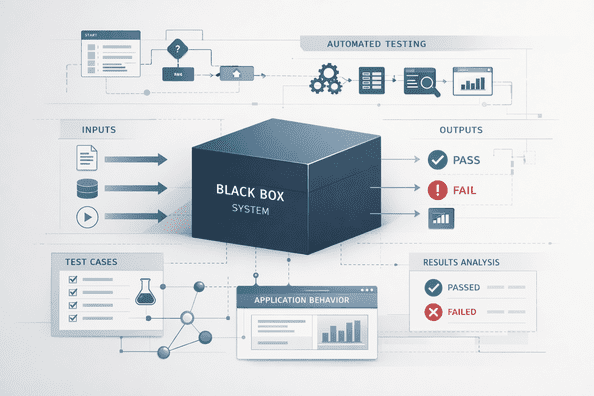
Black box testing focuses on evaluating software functionality from the perspective of an end user. Instead of examining internal code structures, testers interact with the application by providing inputs and observing outputs. This approach helps validate whether user workflows behave correctly under different conditions.
Understanding User Workflows in Software Applications
A user workflow represents the sequence of actions a user performs to accomplish a particular task within an application. These workflows often involve multiple system components working together.
For example, a typical workflow in an online platform might include:
-
Creating an account
-
Logging in to the system
-
Browsing available options
-
Completing a transaction or submitting information
Each step in this process must work correctly for the workflow to succeed. If any step fails or produces unexpected results, the user experience can be negatively affected.
Why Validating Workflows Is Important
User workflows often span several modules of an application. For example, an online purchase may involve product search, inventory management, payment processing, and order confirmation systems.
Even if each module works correctly on its own, problems can arise when these components interact. Validating entire workflows ensures that the system behaves correctly from start to finish.
Black box testing is particularly effective for this purpose because it replicates real user interactions with the application.
Testing the Application from the User Perspective
One of the key strengths of black box testing is its focus on user behavior. Testers simulate real-world usage scenarios by interacting with the application exactly as users would.
For example, when validating a login workflow, testers may verify several situations such as:
-
Successful login with valid credentials
-
Error messages for incorrect login details
-
Account lockout after multiple failed attempts
-
Password reset functionality
By testing these scenarios, teams can ensure that the application responds correctly to both expected and unexpected user inputs.
Verifying End-to-End Workflows
User workflows typically involve multiple steps that must be executed in a specific order. Black box testing helps verify these end-to-end workflows by ensuring that the entire process functions correctly.
For example, consider an e-commerce checkout process. A typical workflow might involve:
-
Selecting products
-
Adding items to the shopping cart
-
Entering shipping information
-
Completing payment
-
Receiving order confirmation
Testing each step as part of a complete workflow helps ensure that the system handles transitions between different stages correctly.
Identifying Functional Issues Early
When workflows are tested from the user’s perspective, functional issues become easier to detect. Problems such as incorrect validation rules, broken navigation paths, or unexpected system responses can be identified before the software is released.
Black box testing helps reveal these issues by focusing on how the system behaves rather than how it is implemented internally. This approach helps teams detect problems that directly affect users.
Supporting Comprehensive Testing Strategies
Modern testing strategies often combine multiple approaches to achieve better test coverage. While black box testing validates external behavior, other testing methods may examine internal system logic.
For example, teams frequently apply both black box testing and white box testing when evaluating software quality. The first approach focuses on functional behavior from the user's perspective, while the second analyzes internal program logic and structure.
Using both approaches together helps ensure that the application works correctly both internally and externally.
Integrating Workflow Testing with Automation
As development teams adopt faster release cycles, manual testing alone may not be sufficient to validate complex workflows repeatedly. Automated testing can help execute workflow-based test cases more efficiently.
Automated functional tests can simulate user interactions such as form submissions, navigation steps, and transaction flows. Running these tests automatically whenever code changes are introduced helps ensure that critical workflows continue to operate correctly.
Automation also enables teams to test workflows across multiple environments and configurations.
Improving Overall Software Quality
By validating real user interactions, black box testing helps teams confirm that applications meet user expectations and business requirements. Ensuring that workflows function correctly improves the reliability and usability of the software.
Applications that support smooth workflows provide a better user experience, reduce frustration, and increase customer satisfaction. As a result, testing user workflows becomes an essential part of modern quality assurance practices.
Conclusion
User workflows represent the real-world interactions that determine whether an application successfully serves its users. Validating these workflows is essential for ensuring that software behaves reliably across different scenarios.
Black box testing helps achieve this by evaluating application behavior from the user's perspective and confirming that each step in a workflow functions as expected. By combining workflow validation with other testing approaches and automation practices, organizations can build more reliable applications and deliver better user experiences.

 English
 Arabic
 French
 Spanish
 Deutsch
 Turkish
 Dutch
Dutch
 Italiano
 Russian
 Romaian
 Portuguese (Brazil)
 Greek
Greek